

EnTrust EDI Integration for Epicor ERP
With Encompass Solutions EnTrust EDI for Epicor ERP, you can automate processes and eliminate errors in manual data entry that slow down your operations and costs you money. Leverage EDI automation to scale and grow your business. SPEAK WITH AN EXPERTSCHEDULE A DISCOVERY CALLEntrust
EnTrust provides Epicor ERP users with a powerful interface for EDI transactions (both inbound and outbound). Transactions can be reviewed, optionally edited, and approved or rejected individually or in batches using EnTrust. Seamless integration with Epicor ERP ensures no duplicate data entry is necessary, and all transactions are performed with the same business logic validations as the standard Epicor ERP client.
Features of EnTrust for Epicor ERP
Allows for inbound and outbound data to be integrated with your EDI translation software.
Allows for alternate data mappings based on trading partner
Supports an “automatic” mode where no user interaction is required
Validates inbound data against Epicor ERP business logic
Supports common EDI transactions
Can support any EDI document
Interactive dashboard mode allowing for approval/denial of transactions by staff
Supports decision tree logic based on the EDI data
Transaction data edits in a graphical environment (Dashboard)
Archived transaction viewer
Custom logic to suit your company’s needs
Transactions with invalid data are presented graphically with the ability to re-process after invalid data have been corrected
How EnTrust Works
Our software sits in between your trading partner or VAN and Epicor ERP by importing the inbound files (830, 850, 940, etc.) and automatically pushing outbound data (810, 856, etc.) to the trading partner. Depending on how you wish the software to be configured, transactions can be processed automatically requiring only intervention upon validation issues, or all files can go into a “hold” status and require approval by a member of your staff.
EnTrust Dashboard
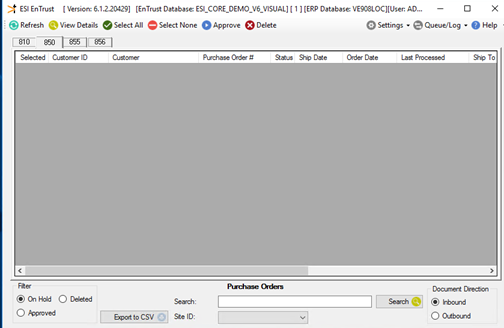
The heart of our offering is a stand-alone dashboard called EnTrust. This tool is an interface used to review, edit, and approve transactions. As mentioned in the previous section, depending on how you implement it, you may see only the errant transactions here or all transactions.
When you first log in to EnTrust you will see a view of each EDI document you have licensed and have the right to view. From here, you will navigate between tabs to find the data you wish to work with and then select the operation you wish to perform, or view the files as needed.
Encompass Solutions Entrust EDI integration solution for Epicor ERP

- Reduce the burden on internal resources
- Take IT out of EDI – users can handle the details and only involve IT when it’s truly IT.
- Eliminate manual data entry.
- Improved visibility to the flow of transactions that are user-friendly.
- Business logic is included in our implementation – we don’t make trading partners conform to your needs, we conform to theirs.
- Quick onboarding of new customers makes for quick compliance.
- Still using core Epicor processes allows all Epicor pieces to work seamlessly with EDI.